Odoo vs. SAP: What’s the Smart ERP Choice for Trading and Distribution in the Philippines?
If you are running a business in the Philippines and someone tells you to “just get an ERP,” your first question is probably: which one? And your second question is probably: how much is this going to cost me?
Odoo and SAP Business One are two of the most commonly compared ERP systems today, and for good reason. Both are full-featured platforms that promise to bring order to your finances, inventory, purchasing, and sales. But they are built differently, priced differently, and suited for various types of businesses. So what is actually different between them, and more importantly, which one makes sense for your operations?
If you are an accountant, finance manager, or business owner in the trading and distribution space and you are trying to figure out which one fits your organization, this article will break it down for you.

The Role of ERP for Modern Distributors
A trading or distribution business moves a lot of parts: purchase orders from multiple suppliers, stocks across different branches or warehouses, customer invoices, delivery tracking, landed costs, and multi-currency transactions. When these are all being managed in separate spreadsheets or disconnected systems, something eventually falls through the cracks.
An ERP ties all of that together. Purchasing, inventory, finance, and sales share the same data in real time, so your stock counts are accurate, your cost of goods reflects actual landed costs, and your financial reports do not require two days of manual reconciliation before you can trust them.
At this point, the question is not whether you need an ERP. The question is which one fits your business without blowing your budget or requiring a six-month implementation that paralyzes your team.
Getting to Know Odoo
Odoo started with a clear goal: make a powerful business software that’s accessible without the enterprise price tag. The system is modular, meaning you pick the apps that match your current needs and build from there. For a trading company, that typically means starting with accounting, inventory, and purchasing. Adding CRM, sales, or an e-commerce channel later is simply a matter of activating another module, no migration required.
Quick stats on Odoo:
- 12 million users worldwide
- 82 fully integrated core apps
- 44,000 apps available in the marketplace
- Available as Odoo Community (free, self-hosted), Odoo Online (cloud subscription), or on-premise

Odoo’s Key Features
Managing sales, inventory, and accounting shouldn’t feel disconnected. Odoo brings everything together into one easy-to-use platform. Below are the key features that power this all-in-one approach:
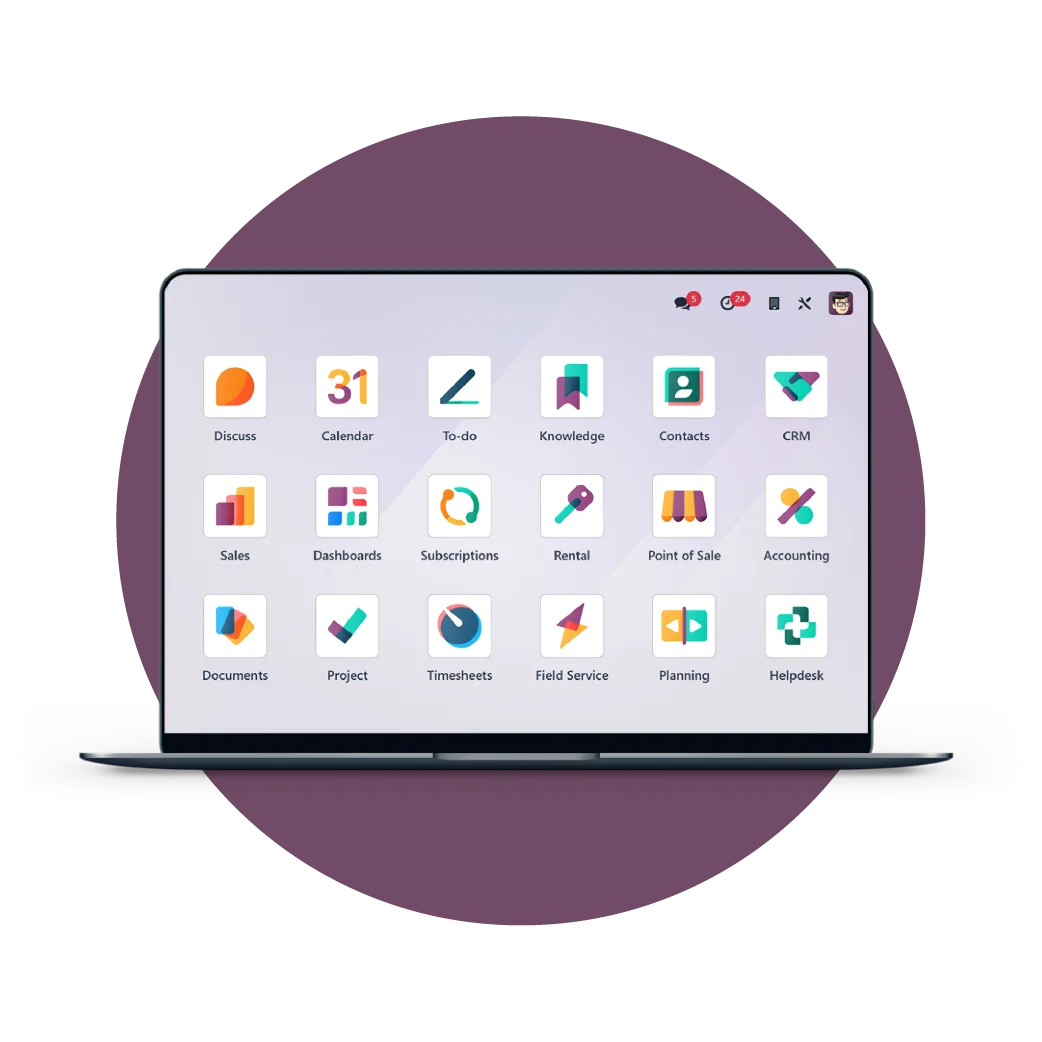
Accounting and Finance: Invoicing, bank reconciliation, multi-currency, tax configuration, dunning, and financial reporting are all built in. Automated tax rules and payment follow-ups reduce manual work, helping finance teams close faster.
CRM and Sales: Drag-and-drop pipelines make it easy to track leads and manage the full sales cycle in one place. Quotes connect directly to deliveries and invoices, eliminating manual handoffs between teams.
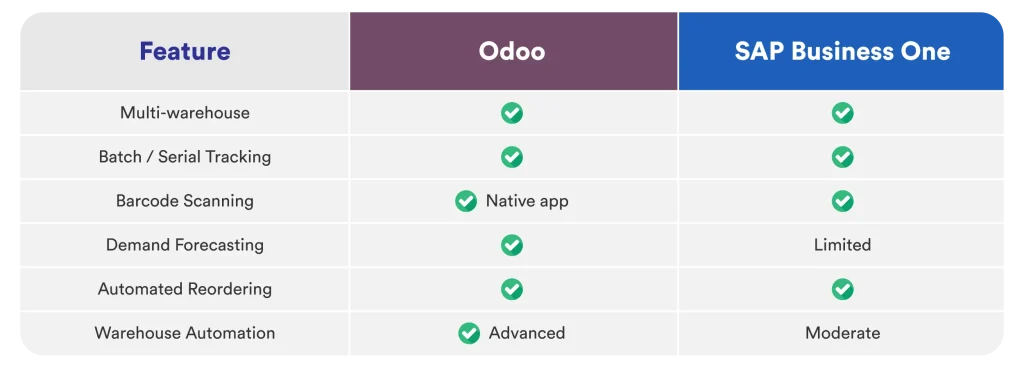
Inventory Management: Multi-warehouse tracking, barcodes, traceability, replenishment rules, and forecasting provide real-time stock visibility. Businesses can easily see what’s moving, what needs restocking, and where inventory is located.
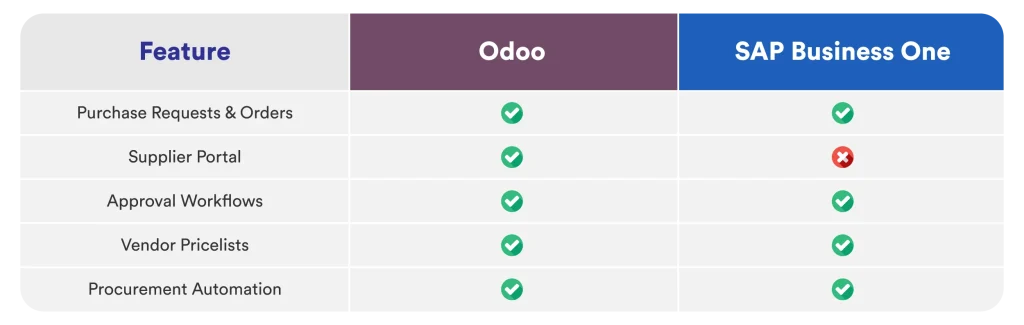
Purchasing: Purchase orders, vendor pricelists, and landed costs sync automatically with inventory and accounting. This removes manual reconciliation and ensures transactions post correctly.
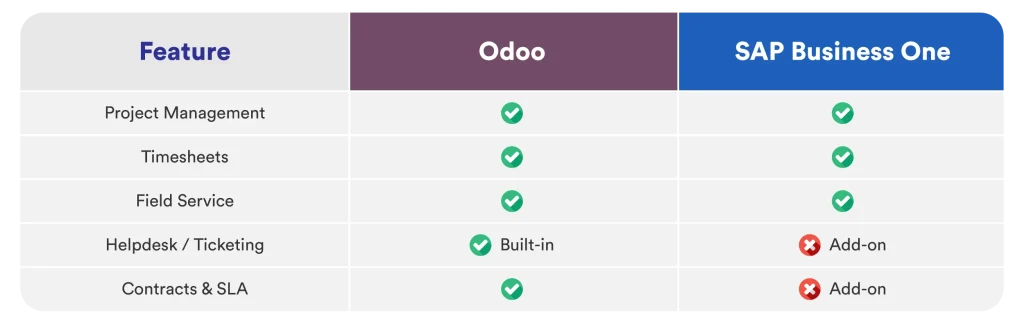
Project Management: Kanban boards, Gantt charts, timesheets, and cost tracking support project-based work. Teams can monitor timelines, budgets, and profitability without using a separate tool.
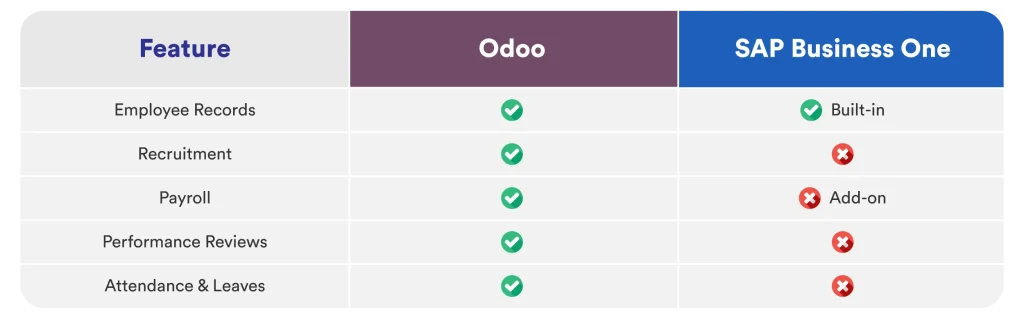
HR and Expenses: Recruitment, leave management, attendance, and expense tracking are handled in one system. Payroll is available via add-ons, making it practical for growing teams.
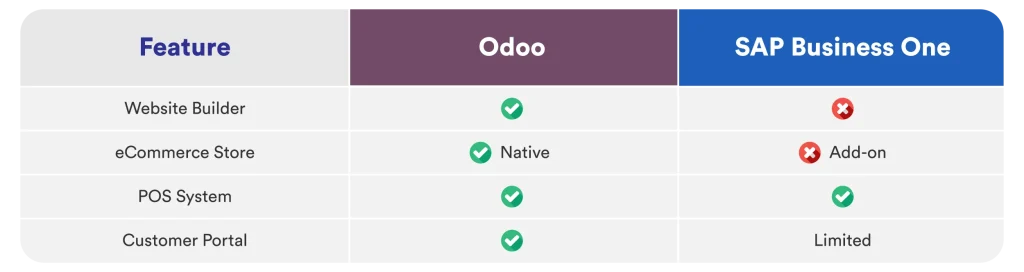
Website and E-commerce: The drag-and-drop website and online store connect directly to inventory and accounting. Stock updates in real time and revenue posts automatically, eliminating reconciliation.
A Closer Look at SAP Business One
SAP has been building enterprise software since 1972. SAP Business One is how they made that experience available to smaller and mid-sized companies, packaging the same financial features into a more compact system.
The financial controls are thorough, the audit trail is deep, and the governance framework suits businesses that have more to manage in terms of compliance and oversight. If you are preparing for a stock listing, managing intercompany transactions, or dealing with strict international audit requirements, SAP Business One is built for that environment.
Key SAP Business One numbers:
- 200 million users across the broader SAP ecosystem
- 300 integrated apps
- Typical implementation time: 3 to 10 months
- Best suited for complex, multi-entity, or internationally compliant operations

SAP Business One’s Key Features
SAP Business One is designed for companies that need deeper control across the business. It covers finance, supply chain, HR, and analytics, but it’s not a quick setup and usually needs solid planning and resources.
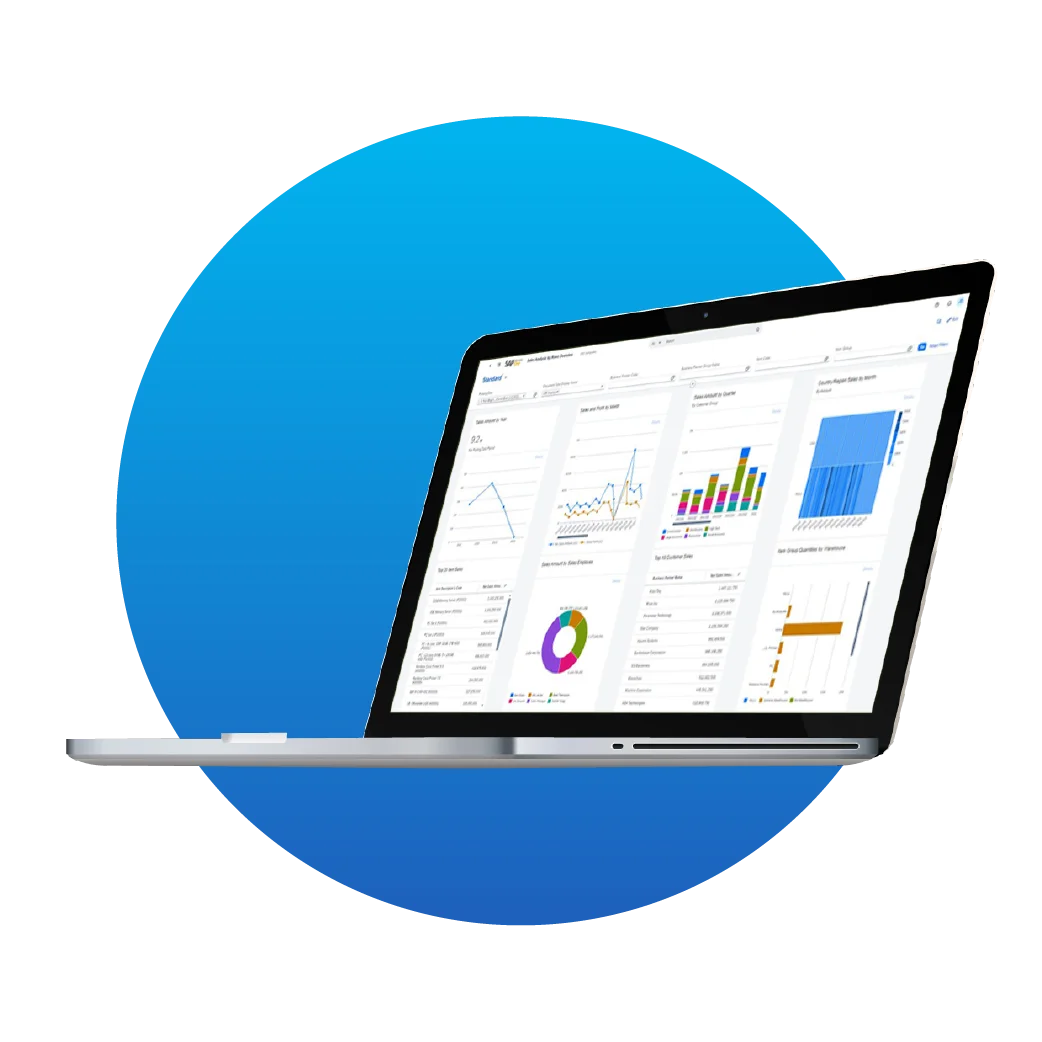
Let’s break down the features that make it powerful:
Finance and Accounting: SAP Business One brings global compliance, multi-company consolidation, and automated closing into one system. It makes intercompany transactions, regulatory reporting, and audits much easier to manage with less manual effort.
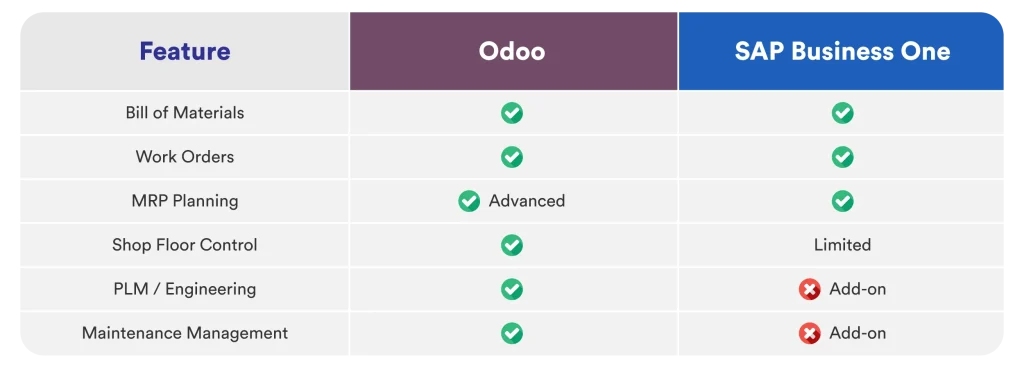
Supply Chain and Purchasing: SAP Business One includes advanced MRP, supplier tracking, contract management, and automated purchasing to keep procurement organized. This helps businesses stay on top of suppliers, plan ahead, and gain better visibility across the supply chain.
HR via SuccessFactors: SAP integrates with SuccessFactors to manage the full employee lifecycle. Recruitment, onboarding, payroll, performance, and workforce planning connect with the broader SAP environment.
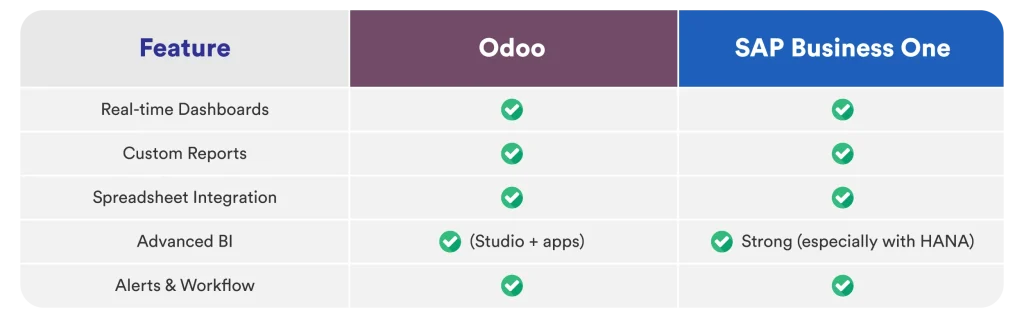
Analytics and Business Intelligence: SAP Analytics Cloud delivers real-time dashboards, predictive reporting, and scenario planning. Executives can conveniently monitor KPIs and make data-driven decisions faster.
AI and Emerging Technology: SAP is continuously embedding AI into finance automation and operational insights. These capabilities help businesses work smarter today while staying ready for future growth.
Odoo vs SAP: Breaking Down the Core Differences
So, is Odoo similar to SAP? At a high level, both platforms cover the basics: finance, inventory, purchasing, sales, and reporting. Both support cloud and on-premise deployment. Both can scale as your business grows. But the experience, the price tag, and who they are designed for are very different.
Odoo is modular and open-source. You activate the apps your business needs now and add more later. It is designed to be accessible to businesses that are not running a large IT department, and the pricing reflects that.
Odoo works best for:
- Growing SMEs in trading and distribution that want flexibility without enterprise-level overhead
- Businesses that want to go live quickly with a few modules and expand the system as needed
- Finance teams without a dedicated in-house IT team
- Business owners who want operational visibility without needing a consultant to generate every report
SAP Business One is built on decades of enterprise software experience. It prioritizes structure, standardization, and deep financial controls, which makes it a strong fit for complex multi-entity or international operations but also means a heavier implementation and higher costs.
SAP Business One works best for:
- Mid-sized to larger organizations managing multiple entities or operating across countries
- Businesses with complex international compliance and audit requirements
- Companies that want the structure and governance that comes with the SAP name
- Organizations with the budget and internal resources for a longer, more involved implementation
For a local or regional trading company at the SME level, Odoo is usually the more practical option. For businesses managing subsidiaries across Southeast Asia or dealing with complex intercompany transactions, SAP Business One has real advantages.

Odoo vs SAP: A Closer Side-by-Side Look
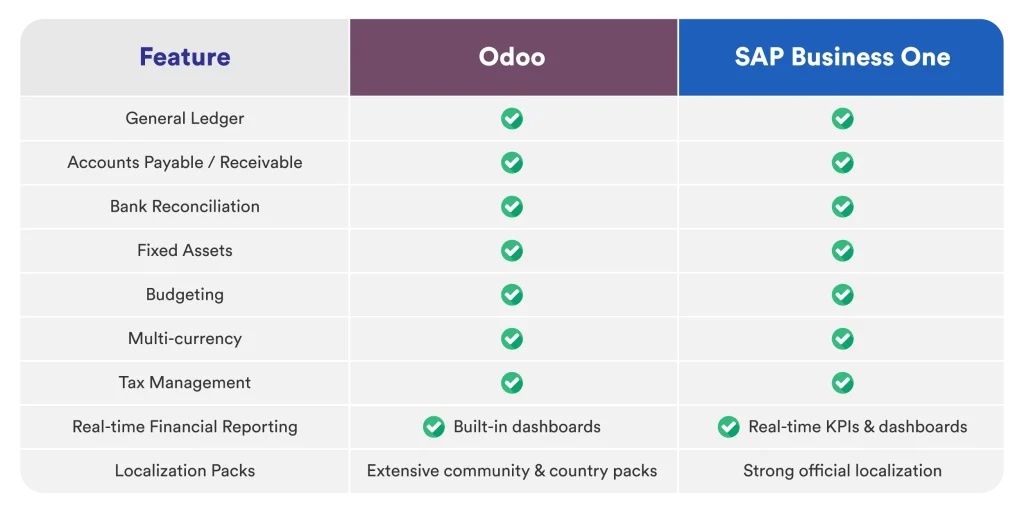
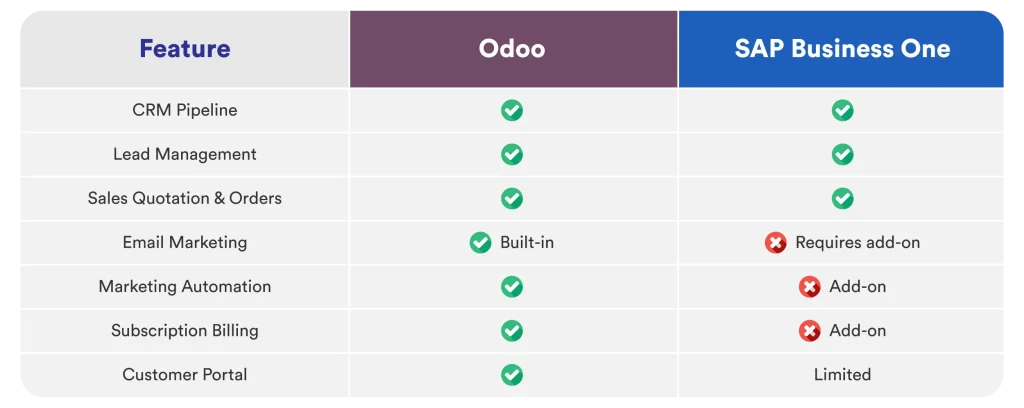
Here is a side-by-side breakdown of how Odoo and SAP Business One stack up across the areas that matter most. Use this as a reference point when weighing your options.
Financial Management & Accounting
Sales, CRM & Marketing
Purchasing & Vendor Management
Inventory & Warehouse
Manufacturing & MRP
Projects & Services
HR & Workforce
eCommerce & Website
Reporting & Business Intelligence
Integration & Extensibility
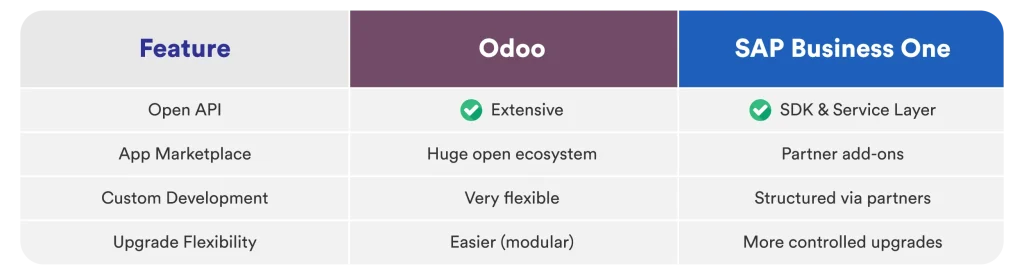
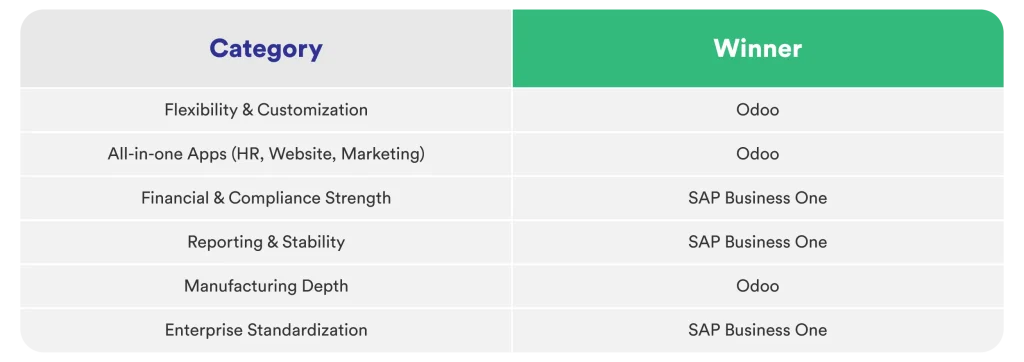
Quick Summary
Ease of Use: How Easy Is It to Get Started?
An ERP that the team finds difficult to navigate will eventually stop being used properly. Adoption is part of the equation. So which one is actually easier to use?
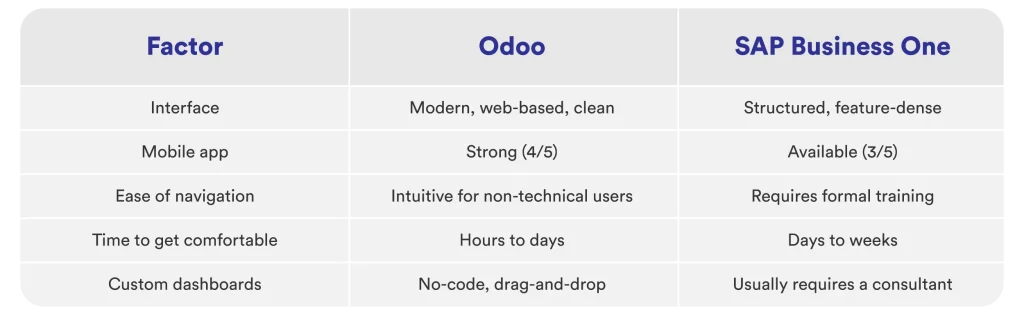
Odoo’s interface is designed for everyday users. Accounting staff can handle invoicing, reconciliation, and reporting without extensive onboarding. SAP Business One is more powerful in certain areas, but it takes more time to get comfortable with, and most workflows involve more steps to complete.
For a team of accountants, warehouse, or sales who are not IT professionals, this difference is felt every single day.

Integration Flexibility: Bringing Your Systems Together
Trading businesses in the Philippines often run alongside other tools: a POS system, an eCommerce platform, courier APIs, or local payment gateways. The ERP needs to connect to these without a major development effort each time.
Odoo has a broad integration ecosystem with over 20,000 apps available, and its open-source foundation makes connecting to other tools relatively straightforward. It works well with widely used platforms like Stripe, Amazon, Google Workspace, and Microsoft 365, and supports quick connections through Zapier for businesses that rely on multiple tools.
For Philippine-based businesses, integrations with Shopee and local payment gateways like Maya are available through official connectors or third-party modules in the Odoo marketplace. The API is accessible, which means a local partner can build custom connections when something specific is needed.
Meanwhile, SAP Business One has strong integration capabilities within the SAP ecosystem and supports major third-party platforms. However, integrations outside the SAP world typically require certified SAP developers and a larger budget.
Implementation Timeline: How Long Before You Are Up and Running?
Odoo implementations for trading and distribution setups typically run from one (1) to six (6) months, depending on the complexity of the configuration and the number of modules involved. The modular approach allows businesses to go live with the core functions first and add more capabilities over time.
SAP Business One implementations typically take three (3) to ten (10) months. The process is more structured and thorough, which suits businesses with complex requirements, but it also means a longer period before the investment starts paying off.


Support and Partner Ecosystem
Odoo has one of the largest open-source communities in the world. In the Philippines, there is a growing network of certified Odoo partners such as Mustard Seed Systems Corporation with experience in local tax requirements, BIR compliance, and Filipino business processes.
As an expert ERP implementation partner in the Philippines, they help businesses tailor Odoo to real operational needs whether that means integrating platforms, configuring industry-specific workflows, building customizations, or refining reporting and analytics. Instead of forcing your processes to fit the software, the right implementation approach ensures the system fits your business and supports long-term growth.
On the other hand, SAP Business One is backed by SAP's global support infrastructure and decades of enterprise experience. The support is professional and well-organized, though local expertise varies and engagement costs tend to be higher.
Final Verdict: Odoo vs SAP
So which one should you go with? Honest answer: it depends on where your business is right now.
Odoo makes sense if:
- The business is a trading or distribution SME that needs a capable, affordable ERP the team will actually use
- Connecting purchasing, inventory, and accounting without a long and expensive rollout is the priority
- Flexibility to customize and integrate as the operation grows is important
- Budget is a real consideration and predictable pricing matters
Go with SAP Business One if:
- The business manages multiple legal entities or operates across several countries
- Financial operations require complex governance and compliance structures
- There is the budget and internal resources for a longer implementation and ongoing consultant engagement
- The long-term path includes migrating to SAP S/4HANA at the enterprise level
For most Philippine trading and distribution businesses at the SME stage, Odoo covers the core needs: accurate inventory, connected purchasing, multi-currency accounting, and solid financial reporting, with the flexibility to grow without needing to replace the system.
On the other hand, SAP Business One is still a strong platform, but for many local companies, it brings a level of complexity and cost that the operation does not yet require.
At the end of the day, the right ERP isn’t about brand recognition—it’s about alignment. Your business goals, operational complexity, internal resources, and growth plans should drive the decision.
ERP selection is a long-term operational strategy. The best ERP is the one your teams will actually use, understand, and trust every single day. If you’re looking for an ERP that truly fits your business, the best system is the one that matches your size, complexity, and growth pace today, while still supporting where you want to go next.
Send us a Message
For more information or inquiry about our products and services, kindly fill out the form below.
Get in Touch
