No featured image available for this article.
Too Many Leads to Track? Manage Them in monday CRM
Managing a growing number of leads can become difficult when customer information, follow-ups, sales activities, and deal updates are spread across spreadsheets, emails, chat messages, and different systems. Sales teams may miss follow-ups, lose track of prospects, or spend too much time checking where each lead stands.
monday CRM gives businesses a centralized platform to organize leads, track sales activities, manage customer information, and monitor the progress of deals in one place.
For companies in the Philippines looking for a practical way to manage sales leads, monday CRM can help create a clearer and more organized sales process.
What Is monday CRM?
monday CRM is a customer relationship management platform designed to help businesses manage leads, contacts, deals, sales activities, and customer interactions.
Instead of keeping lead information in separate spreadsheets or communication channels, teams can use monday CRM to create a centralized workspace where sales information can be viewed and updated.
Businesses can use monday CRM to:
- Capture and organize leads
- Track potential customers
- Manage sales pipelines
- Assign leads to sales representatives
- Monitor follow-up activities
- Track deal stages
- Manage customer information
- Set reminders and tasks
- Monitor sales activities
- View sales performance and reports
This gives sales teams a clearer view of their leads and current opportunities.
Too Many Leads to Track Manually?
A growing number of leads is a good sign for a business, but managing them manually can create problems.
When lead information is stored in Excel files, email threads, chat messages, or different systems, it can become difficult to determine:
- Which leads are new
- Which prospects need follow-up
- Who is handling each lead
- Which leads are qualified
- Which opportunities are close to a sale
- Which prospects have not been contacted
- Which deals have already been won or lost
Without a centralized CRM, sales representatives may also spend unnecessary time searching for customer information instead of following up with prospects.
monday CRM helps bring these sales activities into one organized system.
How monday CRM Helps Manage Leads
1. Keep Lead Information in One Place
Instead of maintaining separate files for different leads, teams can store customer and prospect information in a centralized CRM workspace.
Lead records can include information such as:
- Customer name
- Company
- Contact details
- Lead source
- Assigned sales representative
- Industry
- Lead status
- Deal value
- Follow-up date
- Sales stage
- Notes and activities
This makes it easier for sales teams to find and update information.
2. Track Leads Through the Sales Pipeline
A CRM can help sales teams see where prospects are in the sales process.
For example, a pipeline can include stages such as:
New Lead → Contacted → Qualified → Proposal → Negotiation → Won/Lost
Instead of checking multiple spreadsheets or asking team members for updates, managers can view the current status of opportunities in the CRM.
3. Reduce Missed Follow-Ups
A lead can be lost simply because a follow-up was forgotten.
monday CRM can help sales teams organize follow-up activities, assign tasks, and set dates for the next action.
Sales representatives can see which prospects require attention and what action needs to happen next.
4. Assign Leads to the Right Sales Representative
When multiple salespeople handle leads, it is important to know who is responsible for each prospect.
monday CRM allows teams to assign leads to specific team members so responsibilities are clearer.
This can help prevent situations where:
- Two salespeople contact the same prospect
- A lead is left unattended
- Nobody knows who owns an opportunity
- Follow-ups are delayed
5. Monitor Sales Activities
Sales managers need visibility into what is happening with their leads.
With a centralized CRM, managers can monitor lead status, activities, assigned sales representatives, and opportunities moving through the pipeline.
This provides a clearer picture of the sales team's current workload and opportunities.
monday CRM vs. Managing Leads in Excel
Excel can be useful for maintaining basic customer lists, but managing a large and active sales pipeline through spreadsheets can become challenging.
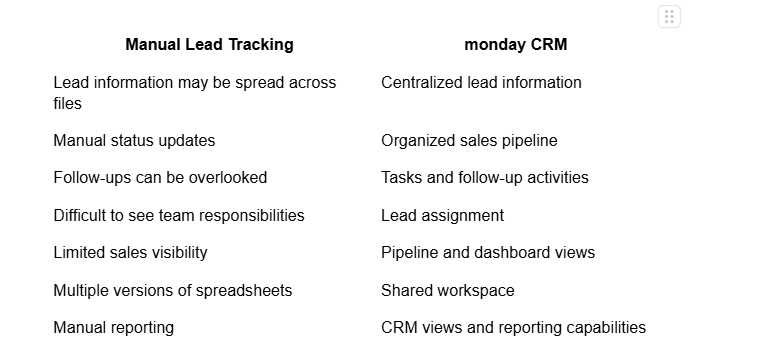
For businesses with an increasing number of leads, moving from spreadsheets to a CRM can provide better visibility and organization.
Who Can Benefit From monday CRM?
monday CRM can be useful for businesses that need to manage a growing number of leads and customer opportunities.
It can support:
- Small and medium-sized businesses
- Sales teams
- Marketing and sales teams
- B2B companies
- Service providers
- Distributors
- Professional services companies
- Companies with multiple sales representatives
- Businesses transitioning from spreadsheets to CRM
It can also be useful for companies that already have a CRM but find their current system difficult to manage or too expensive for their requirements.
What Can You Manage With monday CRM?
A CRM can support more than just storing contact information.
Businesses can use monday CRM to manage different parts of their sales process, including:
How to Start Using monday CRM
A CRM implementation should begin with the way your sales team currently works.
A typical process can include:
- Review Your Current Sales Process
Identify how leads are generated, assigned, followed up, and converted. - Identify the Information You Need to Track
Determine the customer, lead, deal, and activity information your team needs. - Build Your CRM Structure
Create the appropriate lead, contact, deal, and pipeline workflows. - Import Existing Lead Data
Move relevant customer and prospect information from existing spreadsheets or systems. - Set Up User Responsibilities
Assign leads and define responsibilities for each member of the sales team. - Train Your Team
Make sure sales and management teams understand how to use the CRM consistently. - Monitor and Improve the Process
Review how the CRM is being used and adjust the workflow as business requirements change.
Choosing a CRM is not only about selecting software. The way the system is configured and implemented can also affect how effectively your team uses it.
Mustard Seed Systems Corporation can help businesses in the Philippines assess their CRM requirements and implement monday CRM based on their sales process.
27 Years of Technology Implementation Experience
Mustard Seed Systems Corporation has 27 years of technology implementation experience, supporting businesses in the Philippines with business software and technology solutions.
monday CRM Implementation Support
MSSC can assist businesses in planning and setting up monday CRM according to their lead management and sales requirements.
Designed Around Your Sales Process
Instead of simply providing access to a CRM platform, the implementation can consider how your team currently manages leads, assigns sales opportunities, conducts follow-ups, and monitors deals.
Support for Businesses in the Philippines
MSSC provides business technology services to companies across the Philippines, with a nationwide presence and support.
End-to-End Implementation Assistance
Support can include requirements assessment, CRM configuration, data migration, user training, and after-sales support.
Too many leads to track? A centralized CRM can help your sales team stay organized.
monday CRM provides businesses with a platform for managing leads, contacts, sales activities, follow-ups, and opportunities in one place. Instead of relying on multiple spreadsheets and scattered information, your team can have a clearer view of the sales pipeline and current opportunities.
For businesses in the Philippines, Mustard Seed Systems can assist with monday CRM implementation, configuration, data migration, training, and support based on your business requirements.
Want to organize your leads and sales pipeline? Contact Mustard Seed Systems to discuss your monday CRM requirements.
Send us a Message
For more information or inquiry about our products and services, kindly fill out the form below.
Get in Touch
