
Already Using Microsoft? Upgrade to Microsoft Dynamics 365 Business Central
If your business relies on Microsoft 365, Excel, Outlook, or Teams, Business Central is the ERP built to work with the tools your team already uses.
If your business already uses Microsoft 365, you have the perfect foundation for a smarter ERP system. Microsoft Dynamics 365 Business Central extends the capabilities of your existing Microsoft environment by connecting finance, sales, purchasing, inventory, operations, projects, and customer management into one cloud-based business management solution.
Instead of switching between multiple applications, Business Central allows your team to work within familiar Microsoft tools like Outlook, Excel, Microsoft Teams, and Power BI while keeping your business data synchronized in real time.
As a trusted Microsoft Solutions Partner, Mustard Seed Systems Corporation helps businesses in the Philippines successfully implement Microsoft Dynamics 365 Business Central with local expertise, implementation services, training, and ongoing support.
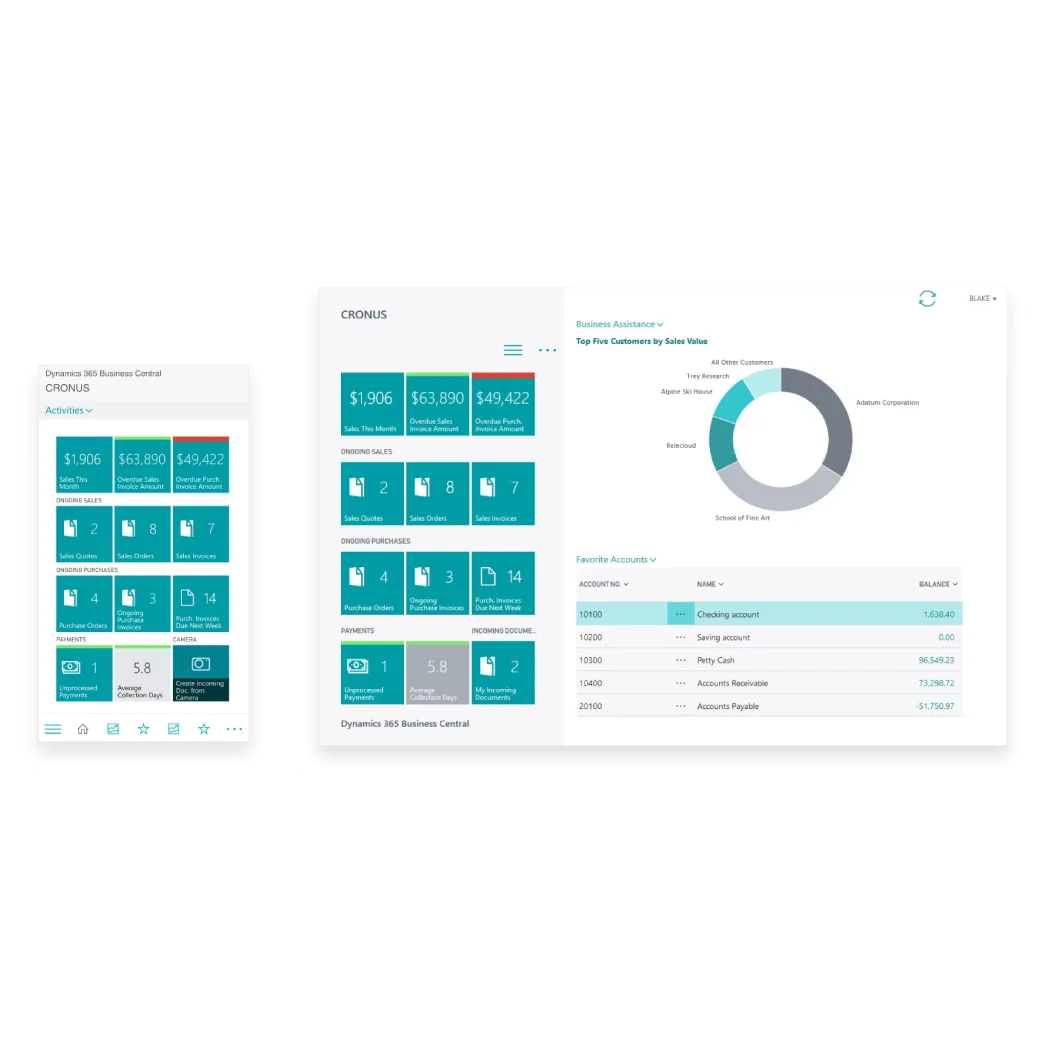
Why Upgrade to Microsoft Dynamics 365 Business Central?
Many businesses start with Microsoft 365 for communication and productivity. As operations grow, spreadsheets and disconnected applications become difficult to manage.
Microsoft Dynamics 365 Business Central helps businesses:
- Manage accounting and financial reporting
- Track inventory across multiple warehouses
- Automate purchasing and sales processes
- Manage projects and job costing
- Improve cash flow visibility
- Generate real-time business reports
- Support business growth with a scalable cloud ERP
Because it is part of the Microsoft ecosystem, your employees can continue working with the applications they already know.
Built for Microsoft Users
Business Central integrates natively with Microsoft technologies you already use. Connect your business data across Microsoft applications to improve productivity and reduce manual work.
Microsoft Outlook Integration
Create sales quotes, invoices, customer records, and purchase orders directly from Outlook without leaving your email.
Benefits
- View customer information inside Outlook
- Send invoices faster
- Reduce manual data entry
- Improve customer response times


Microsoft Excel Integration
Continue using Excel while maintaining data accuracy.
Business Central allows users to:
- Export reports instantly
- Edit data in Excel
- Publish updates back to Business Central
- Reduce spreadsheet duplication
Microsoft Teams Integration
Collaborate with your team using Microsoft Teams while accessing Business Central information.
Employees can:
- Share customer records
- Discuss projects
- Review financial data
- Collaborate on approvals

Microsoft Power BI Integration
Transform ERP data into interactive dashboards.
Track:
- Sales performance
- Inventory levels
- Cash flow
- Financial KPIs
- Operational performance
Key Features of Microsoft Dynamics 365 Business Central
Financial Management
Manage:
- General Ledger
- Accounts Payable
- Accounts Receivable
- Bank Reconciliation
- Fixed Assets
- Budgeting
- Cash Flow Forecasting


Sales Management
Improve sales operations through:
- Quote Management
- Sales Orders
- Customer Pricing
- Customer History
- Invoice Management
Purchasing
Automate purchasing with:
- Purchase Requisitions
- Purchase Orders
- Vendor Management
- Approval Workflows


Inventory Management
Gain real-time inventory visibility.
Features include:
- Warehouse Management
- Multiple Locations
- Lot Tracking
- Serial Number Tracking
- Inventory Forecasting
- Stock Replenishment
Project Management
Track projects from planning to completion.
Monitor:
- Budgets
- Resources
- Time
- Expenses
- Profitability
Manufacturing (Premium)
Manufacturers can manage:
- Production Orders
- Bills of Materials
- Capacity Planning
- Demand Forecasting
- Shop Floor Operations
Why Microsoft Users Choose Business Central

Businesses already using Microsoft technologies benefit from:
- Familiar Microsoft interface
- Faster employee adoption
- Native Microsoft integration
- Cloud accessibility
- Automatic updates
- Enterprise-grade security
- AI-powered business insights with Microsoft Copilot
- Scalable platform that grows with your business
Business Central Helps Growing Businesses
Microsoft Dynamics 365 Business Central is ideal for:
- Manufacturing
- Distribution
- Wholesale
- Retail
- Professional Services
- Construction
- Food & Beverage
- Healthcare
- Trading Companies
Whether you have one office or multiple branches, Business Central provides a centralized platform to manage your entire business.

BIR CAS Ready ERP for Philippine Businesses
Businesses operating in the Philippines need ERP software that supports local compliance.
Microsoft Dynamics 365 Business Central can be configured to support:
- BIR Computerized Accounting System (CAS)
- Electronic Invoicing System (EIS)
- VAT reporting
- Financial reporting
- Audit trails
- Local tax requirements
Mustard Seed Systems provides Business Central implementation with Philippine localization to help businesses meet BIR compliance requirements while improving operational efficiency.

Why Choose Mustard Seed Systems?
Mustard Seed Systems Corporation is one of the leading Microsoft Dynamics 365 Business Central implementation partners in the Philippines.
Our services include:
- Business Process Assessment
- ERP Consultation
- Microsoft Dynamics 365 Business Central Licensing
- System Implementation
- Data Migration
- User Training
- Customization
- BIR CAS Consultation
- Local Support
- After-sales Services
With over 27+ years of experience, Mustard Seed Systems has helped thousands of businesses adopt digital solutions that improve productivity, financial visibility, and operational control.
Send us a Message
For more information or inquiry about our products and services, kindly fill out the form below.
Get in Touch
